
Getting Started
Manage Targets
Manage Scans
Manage Organizations
Organization Settings
Plans
On Prem
On Prem
Mail Server Configuration
Introduction
Mail server configuration allows ZeroThreat to send operational and system-related notifications from your On-Prem deployment. These notifications help teams stay informed about scan activity and administrative events.
Common email notifications include:
- Scan start and completion alerts
- Organization member invitations
- System-generated notifications and status updates
Mail settings are configured at the organization level.
Configure Mail Server
Step 1: Navigate to Mail Server Settings
- Log in to your ZeroThreat On-Prem portal
- Go to Organization Settings
- Select Mail Server Configuration

Step 2: Configure Mail Server Fields
Fill in the following fields based on your SMTP server details:
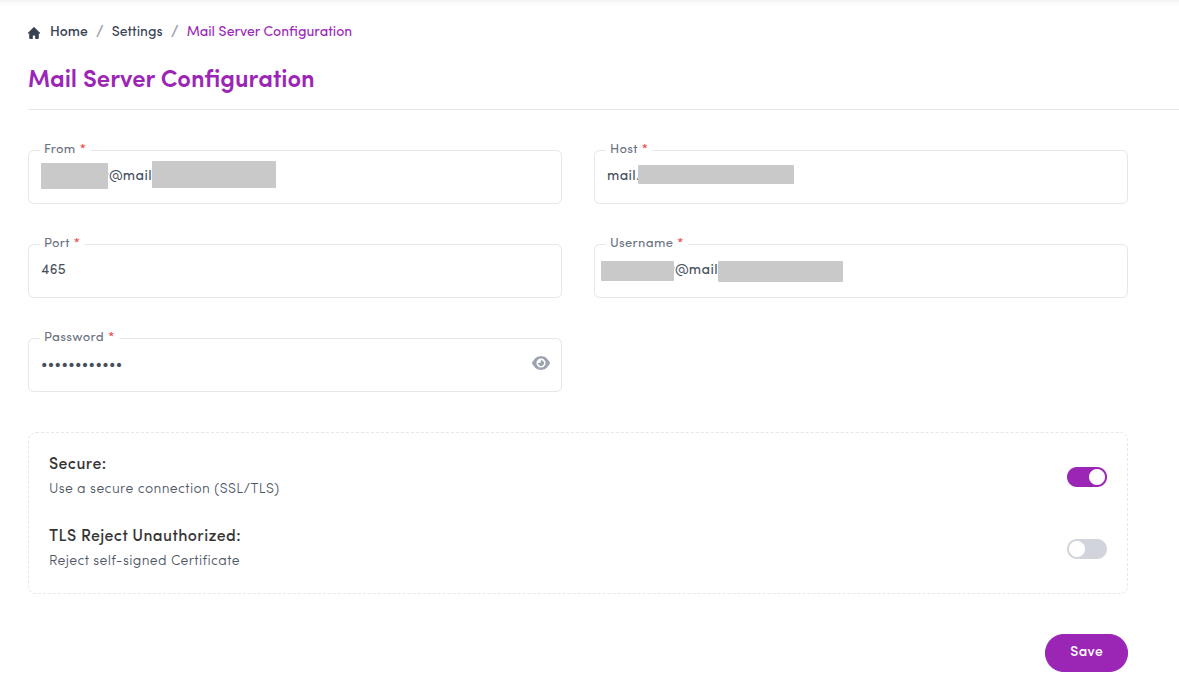
- From
Email address used as the sender
Example:alerts@yourdomain.com - Host
SMTP server hostname
Example:mail.yourdomain.com - Port
SMTP server port
Example:465or587 - Username / Password
Credentials used to authenticate with the SMTP server - Secure (SSL/TLS)
Enable this if your SMTP server requires a secure connection - TLS Reject Unauthorized
Enable this to reject self-signed or untrusted certificates
Save the configuration once all fields are filled.
Common Mail Issues
Many enterprise mail servers block outbound emails to external domains.
If emails are not received:
- Verify SMTP credentials
- Check firewall and mail relay rules
- Confirm that the SMTP server allows external delivery
What’s next?
Mail notifications are now configured. You can continue with scanning workflows or review Automated Pentest Configuration