
Getting Started
Manage Targets
Manage Scans
Manage Organizations
Organization Settings
Plans
On Prem

Vulnerability Registry Configuration
Every application is different. A vulnerability that is critical for one organization may be informational or an acceptable risk for another. The Vulnerability Registry enables you to reflect this reality by giving you control over how vulnerabilities are described, scored, and treated across your organization.
Accessing the Vulnerability Registry
To access the Vulnerability Registry:
- Navigate to Organization Settings in ZeroThreat.
- Under the corresponding organization, Select Vulnerability Registry

- You will see a searchable and filterable list of vulnerabilities detected by ZeroThreat.

From here, you can:
- Search for a specific vulnerability by name
- Filter vulnerabilities by severity
- Open any vulnerability to view its details
- Edit vulnerability metadata to match your organizational context
Viewing and Managing Vulnerability Details
Clicking on a vulnerability opens its detailed view, showing how the vulnerability is defined and presented across scan results and reports. This view provides key information such as the vulnerability title, detection source, assigned severity, CVSS score, descriptive context, recommended remediation guidance, and associated industry references including CWE identifiers and OWASP Top 10 mappings.

From this view, you can also edit and manage how the vulnerability is treated across your organization by clicking the Edit ( ) icon.
You can customise the following fields:
Basic Information
- Description: if needed you can update the vulnerability description to provide a clearer and more accurate explanation of the vulnerability.
- Registry Severity: You can also change the registry severity (Critical, High, Medium, Low, Informational) to better reflect the actual risk of the vulnerability in your environment.

Why update severity?
Adjusting the registry severity is useful when the real-world impact of a vulnerability varies based on business context. For example, directory listing might be considered low impact for a public marketing website, but high impact for a financial or healthcare application where exposed files could reveal sensitive customer or regulatory data.
Severity and Risk Scoring
- CVSS v3.1 Score: Update the numerical score and severity classification if the default scoring does not align with impact in your business context.
- CVSS Severity: Define the severity level (Low, Medium, High, Critical) based on the impact
- CVSS Vector String: Modify the vector string to accurately represent exploitability and impact in your environment.

Remediation Guidance
Remediation guidance allows you to customize instructions on how a vulnerability should be fixed within your organization. By aligning remediation steps with internal practices, approved standards, and existing tooling, you make fixes clearer, more consistent, and easier for engineering teams to act on.

Standards and References
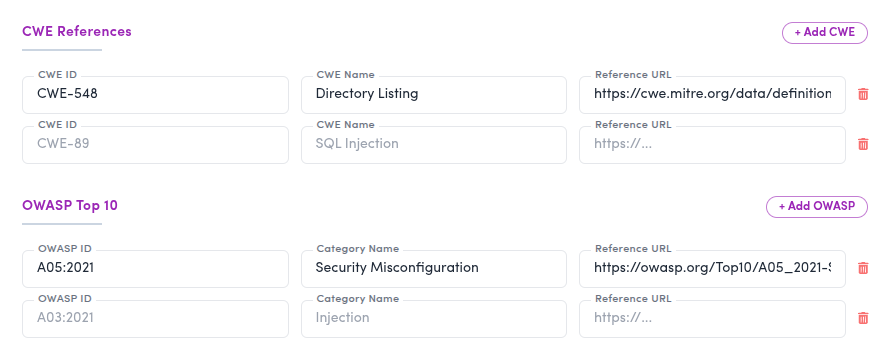
- CWE References: Add, remove, or update CWE IDs associated with the vulnerability.
- OWASP Top 10 Mapping: Map the vulnerability to the appropriate OWASP Top 10 category relevant to your organization or compliance needs.
Ignoring a Vulnerability
Within the same edit view, the Vulnerability Registry provides an Ignore Vulnerability toggle.

When enabled:
- The vulnerability is ignored in all past scan results
- The vulnerability is not reported in future scans
This option is useful when:
- A vulnerability is a known and accepted risk
- The issue is not applicable to your technology stack
- The finding is not relevant within your threat model
Ignoring a vulnerability from vulnerability registry is an organization-wide action. Use this option carefully, as it affects both historical visibility and future detection.For ignoring a vulnerability at an individual scan level, you can do so directly from the corresponding scan report
Impact on Scan Results and Reports
Any changes made in the Vulnerability Registry are retroactive and forward-looking:
- Updates apply to all previous scan results
- Updates automatically affect all future scans
Scan reports immediately reflect:
- Updated severity
- Modified descriptions
- Revised remediation guidance
- Updated CWE and OWASP mappings

This ensures consistency across past scan reports, dashboards, and shared reports.
Conclusion
The Vulnerability Registry enables organizations to move beyond one-size-fits-all vulnerability reporting. By tailoring vulnerability definitions to your environment, ZeroThreat helps you focus on what actually matters, improve remediation efficiency, and produce more meaningful security reports.